Introduction :-
Java has mostly three looping statements such as for, while and do-while. All three looping statements help us iterating over a code which we want to perform frequently. In this tutorial I will be providing to you Java tutorial on these looping statements. Learning Java through explanation and code is the most effective mechanism. I will be providing you with few basics of looping statements , syntax and than provide you with Java source code. After we get few fundamentals of Java looping statements , I will explain you the code through images. This will make you understand all the three looping statements clearly at basic level.
The overall looping process involves 3-4 steps. Let us examine each of them one-by-one :
1. initialization :- A counter variable is set to a value and used to loop the body accordingly.
2. execution of loop body :- After initialization and condition fulfillment body gets executed that many times based on condition and iteration.
3. condition :- After initialization a boolean condition is tested with counter variable. If condition comes out to true body of loop gets executed , if condition comes out to be false the loop terminates.
4. iteration :- Iteration is the increment or decrement process set to counter variable so that we can get exact number of loops.
Let us start with the for loop :
1. for loop statements working :-
Let us look at working of for loop in Java. Before going further you should be familiar with the basics of for loop. Let us view the syntax of the for loop :-


1. Code and Diagram explanation :-
In the ForDemo class we have a main method which is the entry point for the execution of our program. Then comes the for loop statement. If examining the example by above four criteria we see that here initialization step is int i = 0; condition is i <= 10; if the condition is true body of for loop gets executed i.e System.out.println("i = " + i); if the condition is false the for loop exits. After execution of body each time iteration or increment of i is done and then condition is again tested. This process continues till condition fails.
2. while loop statements working :-
Let us look at working of while loop in Java. Before going further you should be familiar with the basics of while loop. Let us view the syntax of the while loop :-

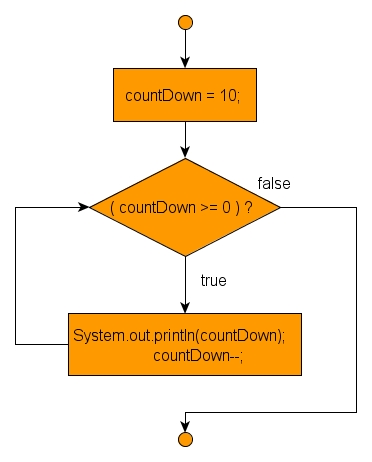
1. Code and Diagram explanation :-
In the WhileDemo class we have a main method which is the entry point for the execution of our program. Then comes initialization of countDown variable. It is assigned with value 10. Then comes the while loop statement. Here condition is countDown>= 10; if the condition is true body of while loop gets executed i.e System.out.println(countDown); and countDown gets decrement to 1. If the condition is false the while loop exits. Again condition is tested. This process continues till condition fails.


1. Code and Diagram explanation :-
In the DoWhileDemo class we have a main method which is the entry point for the execution of our program. After initialization of variable i = 0;. Then comes the do-while loop and body starts executing printing the value of i. Then there is increment in the i value. Then condition is tested that is i<=10; If the condition is true the do loop body again gets executed.This process continues till condition fails. As condition fails the loop gets exit.
Java has mostly three looping statements such as for, while and do-while. All three looping statements help us iterating over a code which we want to perform frequently. In this tutorial I will be providing to you Java tutorial on these looping statements. Learning Java through explanation and code is the most effective mechanism. I will be providing you with few basics of looping statements , syntax and than provide you with Java source code. After we get few fundamentals of Java looping statements , I will explain you the code through images. This will make you understand all the three looping statements clearly at basic level.
The overall looping process involves 3-4 steps. Let us examine each of them one-by-one :
1. initialization :- A counter variable is set to a value and used to loop the body accordingly.
2. execution of loop body :- After initialization and condition fulfillment body gets executed that many times based on condition and iteration.
3. condition :- After initialization a boolean condition is tested with counter variable. If condition comes out to true body of loop gets executed , if condition comes out to be false the loop terminates.
4. iteration :- Iteration is the increment or decrement process set to counter variable so that we can get exact number of loops.
Let us start with the for loop :
1. for loop statements working :-
Let us look at working of for loop in Java. Before going further you should be familiar with the basics of for loop. Let us view the syntax of the for loop :-
A sample for loop code

public class ForDemo {
    public static void main(String[] args) {

        for (int i = 0; i <= 10; i++) {
            System.out.println("i = " + i);
        }
    }
}
1. Code and Diagram explanation :-
In the ForDemo class we have a main method which is the entry point for the execution of our program. Then comes the for loop statement. If examining the example by above four criteria we see that here initialization step is int i = 0; condition is i <= 10; if the condition is true body of for loop gets executed i.e System.out.println("i = " + i); if the condition is false the for loop exits. After execution of body each time iteration or increment of i is done and then condition is again tested. This process continues till condition fails.
2. while loop statements working :-
Let us look at working of while loop in Java. Before going further you should be familiar with the basics of while loop. Let us view the syntax of the while loop :-
A sample while loop code

public class WhileDemo {
    public static void main(String[] args) {

       int countDown = 10;

       while (countDown >= 0) {

          System.out.println(countDown);
          countDown--;
        }
    }
}
1. Code and Diagram explanation :-
In the WhileDemo class we have a main method which is the entry point for the execution of our program. Then comes initialization of countDown variable. It is assigned with value 10. Then comes the while loop statement. Here condition is countDown>= 10; if the condition is true body of while loop gets executed i.e System.out.println(countDown); and countDown gets decrement to 1. If the condition is false the while loop exits. Again condition is tested. This process continues till condition fails.
A sample do-while loop code

public class DoWhileDemo {
    public static void main(String[] args) {
        int i = 0;

        do {
            System.out.println(i);
            i++;
        } while (i <= 10);
    }
1. Code and Diagram explanation :-
In the DoWhileDemo class we have a main method which is the entry point for the execution of our program. After initialization of variable i = 0;. Then comes the do-while loop and body starts executing printing the value of i. Then there is increment in the i value. Then condition is tested that is i<=10; If the condition is true the do loop body again gets executed.This process continues till condition fails. As condition fails the loop gets exit.