Video tutorial to demonstrate serialization in Java.
Showing posts with label Overview of Java. Show all posts
Showing posts with label Overview of Java. Show all posts
What is Serialization in Java ?. (Java Interview Questions and Answers)
Video tutorial to demonstrate serialization in Java.

How to override equals method in Java ? (Video Tutorial)
Video tutorial to demonstrate how to override equals method in Java.
How to override hashcode method in Java ? (Video Tutorial)
Video tutorial to demonstrate how to override hashcode method in Java.
How Java is complete Programming Platform ? (Video Tutorial)
Video tutorial to demonstrate how Java is complete Programming Platform.
How to use Logical Operators in Java ?.
Logical Operators in Java -


Program to demonstrate working of Logical Operators in Java.
public class LogicalOperators {

 public static void main(String[] args) {

  // Logical AND Operator & , &&
  // F & F --> F
  // T & F --> F
  // F & T --> F
  // T & T --> T

  int number1 = 5;
  int number2 = 10;

  boolean b1, b2, b3, b4, b5, b6, b7;

  b1 = (number1 > 6) && (number2 > number1);
  System.out.println(b1);

  b2 = (number1 > 4) && (number2 > number1);
  System.out.println(b2);

  // Logical OR Operator | , ||
  // F | F --> F
  // T | F --> T
  // F | T --> T
  // T | T --> T

        b3 = (number1 > 6) || (number2 > 15);
        System.out.println(b3);

        b4 = (number1 > 3) || (number2 > 11);
        System.out.println(b4);

        // Logical NOT Operator !

        // !T ---> F
        // !F ---> T

        b5 = !(number1 > 3);
        System.out.println(b5);

        b5 = !(number1 > 6);
        System.out.println(b5);

        // Logical XOR Operator ^
        // F ^ F ---> F
        // T ^ F ---> T
        // F ^ T ---> T
        // T ^ T ---> F

        b6 = (number1 > 3) ^ (number2 > 6);
        System.out.println(b6);

        b6 = (number1 > 3) ^ (number2 > 11);
        System.out.println(b6);

 }

}
Output of the program :

A simple program demonstrating how to store properties to an XML file ?
A simple program demonstrating how to store properties to an XML file
Output of the program :

import java.io.FileNotFoundException;
import java.io.FileOutputStream;
import java.io.IOException;
import java.util.Properties;


public class StoreXmlDemo {

   public static void main(String[] args) {

 String file = "customer.xml";

 // Create a FileOutputStream by providing
 // name of file
 FileOutputStream fis;
 try {
           fis = new FileOutputStream(file);

    // Create a Properties Object
    Properties properties = new Properties();
    // Set few properties on it
           properties.setProperty("firstname", "Jonty");
           properties.setProperty("lastname", "Magicman");
           properties.setProperty("email", "Jonty@magic.com");
           // After setting properties, try to store in the xml
           // by calling storeToXML() method
    properties.storeToXML(fis, "CustomerInfo", "UTF-16");

 } catch (FileNotFoundException e) {

  e.printStackTrace();
 } catch (IOException e) {

  e.printStackTrace();
 }
   }

}
Output of the program :
A simple program demonstrating how to load properties from an xml file ?
A simple program demonstrating how to load properties from an xml file
XML file used to load properties :

Output of the program :

import java.io.FileInputStream;
import java.io.IOException;
import java.util.InvalidPropertiesFormatException;
import java.util.Properties;


public class LoadXmlDemo {

   public static void main(String[] args) {

 LoadXmlDemo load = new LoadXmlDemo();

 Properties properties = load.getProperties();
 String email = properties.getProperty("email");
 String firstname = properties.getProperty("firstname");
 String lastname = properties.getProperty("lastname");

 System.out.println("Email of the Customer : " + email);
 System.out.println("Firstname of the Customer : " + firstname);
 System.out.println("Lastname of the Customer : " + lastname);

   }

   public Properties getProperties() {
 Properties prop = new Properties();
 try {
            FileInputStream fis = new FileInputStream("Customer.xml");

     prop.loadFromXML(fis);

 } catch (InvalidPropertiesFormatException e) {

    e.printStackTrace();
 } catch (IOException e) {

    e.printStackTrace();
 }
 return prop;
   }
}
XML file used to load properties :
Output of the program :
A simple Java program demonstrating how to use enum in switch statements
Program to demonstrate how to use enum in switch statements in Java
Output of the program :
So you like: Mumbai Indians
package com.hubberspot.examples;

import java.util.Scanner;

enum IndianPremierLeague {

 DECCAN_CHARGERS,
 KOLKATA_KNIGHT_RIDERS,
 MUMBAI_INDIANS,
 CHENNAI_SUPER_KINGS,
 RAJASTHAN_ROYALS,
 ROYAL_CHALLENGERS_BANGALORE,
 KINGS_XI_PUNJAB,
 PUNE_WARRIORS,
 DELHI_DAREDEVILS

}

public class SwitchEnumTest {


   public static void main(String[] args) {

 IndianPremierLeague team = IndianPremierLeague.MUMBAI_INDIANS;

 System.out.print("So you like: ");

 switch (team) {

           case DECCAN_CHARGERS:
  System.out.println("Deccan Chargers");
  break;

           case KOLKATA_KNIGHT_RIDERS:
  System.out.println("Kolkata Night Riders");
  break;

    case MUMBAI_INDIANS:
  System.out.println("Mumbai Indians");
  break;

           case CHENNAI_SUPER_KINGS:
  System.out.println("Chennai Super Kings");
  break;

    case RAJASTHAN_ROYALS:
  System.out.println("Rajasthan Royals");
  break;

    case ROYAL_CHALLENGERS_BANGALORE:
  System.out.println("Royal Challengers Bangalore");
  break;

    case KINGS_XI_PUNJAB:
    System.out.println("Kings XI Punjab");
  break;

    case PUNE_WARRIORS:
  System.out.println("Pune Warriors India");
  break;

    case DELHI_DAREDEVILS:
  System.out.println("Delhi Daredevils");
  break;

    default:
    System.out.println("Invalid IPL team choosen");
      }
   }
}
Output of the program :
So you like: Mumbai Indians
What is SuppressWarnings annotation? Along with Java program
What are Annotations in Java ?.
Annotations in Java are metadatas that adds information to your code in a formal way so that you can keep track to the information added at a later stage. They provide a Java programmer information which describes the program fully in a sophisticated way. Annotations help us in generating descriptor files and giving us way to write boilerplate code each time.
Annonations in Java have a symbol @ in its syntax declaration. Java contains general purpose built in annotations defined in java.lang package as :
@SuppressWarnings : Generally, it is used when we want compiler to turn off the warnings it is displaying.
Program to demonstrate @SuppressWarning annotation in Java
package com.hubberspot.example;

import java.util.Random;
import java.util.Scanner;
import java.util.Date;
import java.util.ArrayList;
import java.util.Set;
import java.util.List;
import java.util.Map;
import java.util.HashMap;
import java.util.AbstractCollection;
import java.util.Arrays;
import java.util.Vector;
import java.util.TreeSet;

//1. unused imports warning suppressed by
//@SuppressWarnings("unused")

//2. The serializable class SuppressWarningDemo does
//not declare a static final serialVersionUID field
//of type long warning suppressed by
//@SuppressWarnings("serial")

@SuppressWarnings({"unused", "serial"})
public class SuppressWarningDemo extends Exception {

//3. finally block does not complete normally
//warning suppressed by @SuppressWarnings("finally")

 @SuppressWarnings("finally")
 public static void main(String[] args) {

//4. The constructor Date(int, int, int) is deprecated
// warning suppressed by @SuppressWarnings("deprecation")

  @SuppressWarnings("deprecation")
  Date date = new Date(2012,8,20);

//5. ArrayList is a raw type. References to generic type
// ArrayList should be parameterized warning suppressed
// by @SuppressWarnings("rawtypes")

  @SuppressWarnings("rawtypes")
  ArrayList list = new ArrayList();

  try{

  }finally{
   return;
  }

 }

}
How to compare Strings in Java with or without case sensitivity ?
Program to compare Strings in Java with or without case sensitivity
Output of the program :

package com.hubberspot.example;

public class StringComparison {

   public static void main(String[] args) {

 String first = "StringComparison";
 String second = "StringComparison";
 String third = "stringcomparison";
 String fourth = "TesTcoMpaRisOn";
 String fifth = "STRINGCOMPARISON";

 System.out.println("first.equals(second) : "+first.equals(second));
 System.out.println("first.equals(third) : "+first.equals(third));
 System.out.println("first.equals(fourth) : "+first.equals(fourth));
 System.out.println("first.equals(fifth) : "+first.equals(fifth));
 System.out.println();
 System.out.println("first.equalsIgnoreCase(second) : "
                    +first.equalsIgnoreCase(second));
 System.out.println("first.equalsIgnoreCase(third) : "
                    +first.equalsIgnoreCase(third));
 System.out.println("first.equalsIgnoreCase(fourth) : "
                    +first.equalsIgnoreCase(fourth));
 System.out.println("first.equalsIgnoreCase(fifth) : "
                    +first.equalsIgnoreCase(fifth));
 System.out.println();

 System.out.println("second.equals(third) : "+second.equals(third));
 System.out.println("second.equals(fourth) : "+second.equals(fourth));
 System.out.println("second.equals(fifth) :    "+second.equals(fifth));
 System.out.println();
 System.out.println("second.equalsIgnoreCase(third) : "
                    +second.equalsIgnoreCase(third));
 System.out.println("second.equalsIgnoreCase(fourth) : "
                    +second.equalsIgnoreCase(fourth));
 System.out.println("second.equalsIgnoreCase(fifth) : "
                    +second.equalsIgnoreCase(fifth));
 System.out.println();

 System.out.println("third.equals(fourth) : "+third.equals(fourth));
 System.out.println("third.equals(fifth) : "+third.equals(fifth));

 System.out.println("third.equalsIgnoreCase(fourth) : "
                     +third.equalsIgnoreCase(fourth));
 System.out.println("third.equalsIgnoreCase(fifth) : "
                     +third.equalsIgnoreCase(fifth));

 System.out.println();
 System.out.println("fourth.equals(fifth) : "+fourth.equals(fifth));
 System.out.println();
 System.out.println("fourth.equalsIgnoreCase(fifth) : "
                     +fourth.equalsIgnoreCase(fifth));
 System.out.println();
   }

}
Output of the program :
How and When to Deprecate methods in Java programming language
What are Annotations in Java ?.
Annotations in Java are metadatas that adds information to your code in a formal way so that you can keep track to the information added at a later stage. They provide a Java programmer information which describes the program fully in a sophisticated way. Annotations help us in generating descriptor files and giving us way to write boilerplate code each time.
Annonations in Java have a symbol @ in its syntax declaration. Java contains general purpose built in annotations defined in java.lang package as :
@Deprecated : Generally, it gives a programmer a compiler warning if he wishes to use a thing which is marked as Deprecated.
Program to demonstrate how to deprecate methods in Java
package com.hubberspot.example;

public class DeprecateTest {
   // One way do deprecate is to use
   // @Deprecated annotation
   @Deprecated
   public void draw() {
 System.out.println("Deprecated by @Deprecated annotation");
   }

   /**
    * @deprecated
    *
    */
    public void area() {
 System.out.println("Deprecated by @deprecated javadoc tag");
    }

    public static void main(String[] args) {

 DeprecateTest test = new DeprecateTest();
 // It might be unavailable in next release
 // say method is inefficient, having bugs,
 // insecure in implementation and may result
 // in bad coding practices
 test.draw();
 test.area();

   }

}
Output of the program :

Program to demonstrate how to Clone an Object in Java
Program to demonstrate how to Clone an Object in Java
Output of the program :

package com.hubberspot.example;

//1. class should implement Cloneable interface
public class Customer implements Cloneable {

   private int id;
   private String name;

   public String toString() {
 return "(id = " + id + ", name = " + name + ")";
   }

//2. class should override clone() method
//3. will throw CloneNotSupportedException exception if
// interface not implemented ...
   @Override
   protected Object clone() throws CloneNotSupportedException {
 return super.clone();
   }

   public static void main(String[] args) {
 Customer customer = new Customer();
 customer.id = 5;
 customer.name = "magicman";

 try {
       //4. calling clone() method to clone Customer
     Customer customerClone = (Customer) customer.clone();
     System.out.println("Cloned Customer before changes = "
                           + customerClone);

     customerClone.id = 10;
     customerClone.name = "jonty";

     System.out.println("Cloned Customer after changes = "
                           + customerClone);

            System.out.println("Original Customer = " + customer);
 }
 catch (CloneNotSupportedException e) {
     e.printStackTrace();
 }
   }
}
Output of the program :
A simple Java program demonstrating Bitwise exclusive OR operation
Program to demonstrate Bitwise exclusive OR operation in Java
Output of the program :

package com.hubberspot.examples;

import java.util.Random;

public class XORTest {

   public static void main(String[] args) {

 Random random = new Random(48);

 int number1 = random.nextInt(7);
 int number2 = random.nextInt(8);

 System.out.println("number1 : " + number1);
 System.out.println("number2 : " + number2);

 int result = number1 ^ number2;
 System.out.println("result : " + result);
 System.out.println();
 System.out.println(number1 + " ^ "+number2 + " = " + result);
 System.out.println();
 System.out.println("Printing result in binary format : ");
 System.out.println(Integer.toBinaryString(number1) + " ^ "+
                    Integer.toBinaryString(number2) + " = " +
             Integer.toBinaryString(result));


 }

}
Output of the program :
@Override Annotations usage in Java Programming Language
What are Annotations in Java ?.
Annotations in Java are metadatas that adds information to your code in a formal way so that you can keep track to the information added at a later stage. They provide a Java programmer information which describes the program fully in a sophisticated way. Annotations help us in generating descriptor files and giving us way to write boilerplate code each time.
Annonations in Java have a symbol @ in its syntax declaration. Java contains general purpose built in annotations defined in java.lang package as :
1. @Override : This annotation is used over method which we intend to override in sub-class. It generates compile-time error if we accidentally give method signature incorrect at the time of overriding.
Program to demonstrate how to use @Override Annotation in Java
package com.hubberspot.examples;

class Shape {

 public void draw() {
  System.out.println("Shape draw()");
 }

 public void name(){
  System.out.println("Shape name()");
 }
}

public class Triangle extends Shape {

 @Override
 public void draw() {
  System.out.println("Triangle draw()");
 }

 @Override
 public void name() {
  System.out.println("Triangle name()");
 }

// Compiler throws an error Triangle must
// override or implement supertype method
 @Override
 public void draw(int a) {
  System.out.println("Triangle draw()");
 }

}
Program demonstrating Switch statement working in Java
Program to demonstrate working of Switch statements in Java
Output of the program :

package com.hubberspot.examples;

import java.util.Scanner;

public class SwitchTest {


    public static void main(String[] args) {

     Scanner scanner = new Scanner(System.in);

        System.out.println("This seasons IPL Teams : ");
 System.out.println("***********************************");
        System.out.println("1. Deccan Chargers");
        System.out.println("2. Kolkata Night Riders");
        System.out.println("3. Mumbai Indians");
        System.out.println("4. Chennai Super Kings");
        System.out.println("5. Rajasthan Royals");
        System.out.println("6. Royal Challengers Bangalore");
        System.out.println("7. Kings XI Punjab");
        System.out.println("8. Pune Warriors India");
        System.out.println("9. Delhi Daredevils");
        System.out.print("");
        System.out.println("***********************************");
        System.out.print("Please choose your favorite IPL team: ");

        int team = scanner.nextInt();

        System.out.print("So you like: ");

        switch (team) {
            case 1:
                System.out.println("Deccan Chargers");
                break;
            case 2:
                System.out.println("Kolkata Night Riders");
                break;
            case 3:
                System.out.println("Mumbai Indians");
                break;
            case 4:
                System.out.println("Chennai Super Kings");
                break;
            case 5:
                System.out.println("Rajasthan Royals");
                break;
            case 6:
                System.out.println("Royal Challengers Bangalore");
                break;
            case 7:
                System.out.println("Kings XI Punjab");
                break;
            case 8:
                System.out.println("Pune Warriors India");
                break;
            case 9:
             System.out.println("Delhi Daredevils");
             break;
            default:
                System.out.println("Invalid IPL team choosen");
        }
    }
}
Output of the program :
How Class Loaders in Java loads classes in memory ?.
Class Loaders in Java programming language provides a way to
load Java classes into the memory. The Class Loaders are important and powerful
tool in JVM, which loads Java classes into memory when required. The Java class
is loaded for the very first time when JVM calls public static void main(String
[] args) method present in Java class file to load at runtime. All the classes
referenced by the main class are than loaded when needed. A class loader than
creates a namespace for the java classes loaded and already running into the
JVM.
There can be many class loaders running into a JVM whose
main purpose is to provide and loads the class at the runtime. All JVM running
in a environment must have at least one Java Class Loader which is called as
bootstrap class loader (primordial), embedded into an JVM. There are also
non-primordial class loaders too. The JVM also provides user defined class
loaders, which can be used in place of primordial class loaders.
There are various class loaders created by JVM itself which
are as follows :
1. Bootstrap Class Loader : This is most powerful class
loader that JVM uses to load JDK's internal classes, such as java.* packages.
The jar loaded by these class loader such as rt.jar and i18n.jar. This class
loader is not reloadable.
2. Extensions Class Loader : This class loader comes after
Bootstrap Class Loader. This class loader is
powerful, that JVM uses to load jars from JDK extensions directory i.e.
from lib/ext folder of the JRE. This class loader is not reloadable.
3. System Class Loader : This class loader comes after
Extensions Class Loader. This class loader is
powerful, that JVM uses to load jars from system classpath. This is
loaded by setting CLASSPATH environment variable. This class loader is not
reloadable
JVM class loaders use delegation model when loading java
classes. They are hierarchical in nature which means child loaders asks their
parent class loader to load classes before they start loading the classes. So
doing this maintains the uniqueness in class loading and no classes are loaded
twice in JVM.
How Java Source File Structure is written in a program ?.
Java Source File Structure
A simple source file is considered to be a Java File, if it follows some rules and regulations. The Java Source file maintains a order and various elements that occur in that source file should follow the order. Java Source File structure should follow rules and order as follows :
1. Java source file should start with a package declaration. The package declaration is optional for Java source file. If the package declaration is default than the package declaration is optional.
2. After the package declaration there comes a section of import declarations. Import declarations can be zero or more. These import statements introduce type or static member names in the source code. Its mandatory to place all import declarations before actual class declarations in Java source code.
3. After import statements comes the type declarations statements. These statements have type declarations which are considered top-level. There can be any number of such type declarations, generally consisting of class , interface and enum etc. The order of type declarations is not mandatory.
4. The Java source file should have one and only one public class. The class name which is defined as public should be the name of Java source file along with .java extention.
How to use break and continue statements in Java ?
break and continue statements in Java
In Java, we use break and continue statements frequently. We use in conditions where we want to get out of the loops. Normally we have to wait for the condition for getting an exit from the loops, this is performance hit as we are done with our task and still loop is getting executed. Keyword break is used to get such functionality. Whenever program execute a break statement in a loop, the control of execution passes to the next statement right after the currently executing loop. Whereas, in some cases we may want to take control to the beginning of the loop, bypassing the loop statements which have not yet been executed. This can be done using the continue statement.
A Simple Program demonstrating use of break and continue statements in Java
0 8 16 24 32 40 48 56 64 72
In Java, we use break and continue statements frequently. We use in conditions where we want to get out of the loops. Normally we have to wait for the condition for getting an exit from the loops, this is performance hit as we are done with our task and still loop is getting executed. Keyword break is used to get such functionality. Whenever program execute a break statement in a loop, the control of execution passes to the next statement right after the currently executing loop. Whereas, in some cases we may want to take control to the beginning of the loop, bypassing the loop statements which have not yet been executed. This can be done using the continue statement.
A Simple Program demonstrating use of break and continue statements in Java
package com.hubberspot.control.example;

public class BreakAndContinueDemo {
  public static void main(String[] args) {
    for(int i = 0; i < 100; i++) {
      if(i == 80)
       break;
      if(i % 8 != 0)
       continue;
      System.out.print(i + " ");
    }
  }
}
Output of the program : 0 8 16 24 32 40 48 56 64 72
What is difference between equals() method and == operator in Java ?
What is difference between equals() method and == operator in Java ? .
Equals( ) method and == has very vital role to play when comparing two objects of any kind. Both of the equals( ) method and == operator returns true when two objects reference compared with each other points to same objects. While the comparisons change when we override equals method. String class has overridden this method , thats why they show different behavior as demonstrated below.
Program to demonstrate the difference between equals() method and == operator in Java
Output of the program :

Equals( ) method and == has very vital role to play when comparing two objects of any kind. Both of the equals( ) method and == operator returns true when two objects reference compared with each other points to same objects. While the comparisons change when we override equals method. String class has overridden this method , thats why they show different behavior as demonstrated below.
Program to demonstrate the difference between equals() method and == operator in Java
package com.hubberspot.operators.example;

public class EqualityTest {
  public static void main(String[] args) {
    String string1 = new String("Test");
    String string2 = new String("Test");

    String string3 = new String("New Test");
    String string4 = new String("Old Test");

    System.out.println("string1 == string2 : "
       + (string1 == string2));
    System.out.println("string1 != string2 : "
       + (string1 != string2));

    System.out.println("string3 == string4 : "
       + (string3 == string4));
    System.out.println("string3 != string4 : "
       + (string3 != string4));

    System.out.println("string1.equals(string2) : "
       +string1.equals(string2));

    System.out.println("string3.equals(string4) : "
       +string3.equals(string4));
  }
}
Output of the program :
How to use for , while and do-while loop statements in Java code
Introduction :-
Java has mostly three looping statements such as for, while and do-while. All three looping statements help us iterating over a code which we want to perform frequently. In this tutorial I will be providing to you Java tutorial on these looping statements. Learning Java through explanation and code is the most effective mechanism. I will be providing you with few basics of looping statements , syntax and than provide you with Java source code. After we get few fundamentals of Java looping statements , I will explain you the code through images. This will make you understand all the three looping statements clearly at basic level.
The overall looping process involves 3-4 steps. Let us examine each of them one-by-one :
1. initialization :- A counter variable is set to a value and used to loop the body accordingly.
2. execution of loop body :- After initialization and condition fulfillment body gets executed that many times based on condition and iteration.
3. condition :- After initialization a boolean condition is tested with counter variable. If condition comes out to true body of loop gets executed , if condition comes out to be false the loop terminates.
4. iteration :- Iteration is the increment or decrement process set to counter variable so that we can get exact number of loops.
Let us start with the for loop :
1. for loop statements working :-
Let us look at working of for loop in Java. Before going further you should be familiar with the basics of for loop. Let us view the syntax of the for loop :-


1. Code and Diagram explanation :-
In the ForDemo class we have a main method which is the entry point for the execution of our program. Then comes the for loop statement. If examining the example by above four criteria we see that here initialization step is int i = 0; condition is i <= 10; if the condition is true body of for loop gets executed i.e System.out.println("i = " + i); if the condition is false the for loop exits. After execution of body each time iteration or increment of i is done and then condition is again tested. This process continues till condition fails.
2. while loop statements working :-
Let us look at working of while loop in Java. Before going further you should be familiar with the basics of while loop. Let us view the syntax of the while loop :-

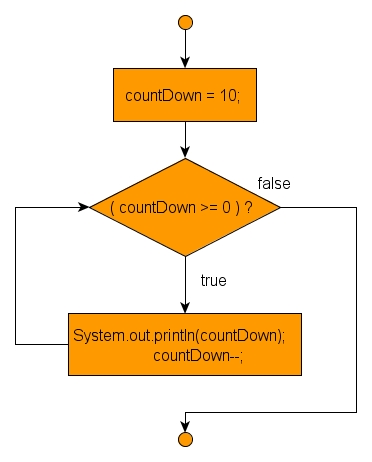
1. Code and Diagram explanation :-
In the WhileDemo class we have a main method which is the entry point for the execution of our program. Then comes initialization of countDown variable. It is assigned with value 10. Then comes the while loop statement. Here condition is countDown>= 10; if the condition is true body of while loop gets executed i.e System.out.println(countDown); and countDown gets decrement to 1. If the condition is false the while loop exits. Again condition is tested. This process continues till condition fails.


1. Code and Diagram explanation :-
In the DoWhileDemo class we have a main method which is the entry point for the execution of our program. After initialization of variable i = 0;. Then comes the do-while loop and body starts executing printing the value of i. Then there is increment in the i value. Then condition is tested that is i<=10; If the condition is true the do loop body again gets executed.This process continues till condition fails. As condition fails the loop gets exit.
Java has mostly three looping statements such as for, while and do-while. All three looping statements help us iterating over a code which we want to perform frequently. In this tutorial I will be providing to you Java tutorial on these looping statements. Learning Java through explanation and code is the most effective mechanism. I will be providing you with few basics of looping statements , syntax and than provide you with Java source code. After we get few fundamentals of Java looping statements , I will explain you the code through images. This will make you understand all the three looping statements clearly at basic level.
The overall looping process involves 3-4 steps. Let us examine each of them one-by-one :
1. initialization :- A counter variable is set to a value and used to loop the body accordingly.
2. execution of loop body :- After initialization and condition fulfillment body gets executed that many times based on condition and iteration.
3. condition :- After initialization a boolean condition is tested with counter variable. If condition comes out to true body of loop gets executed , if condition comes out to be false the loop terminates.
4. iteration :- Iteration is the increment or decrement process set to counter variable so that we can get exact number of loops.
Let us start with the for loop :
1. for loop statements working :-
Let us look at working of for loop in Java. Before going further you should be familiar with the basics of for loop. Let us view the syntax of the for loop :-
A sample for loop code

public class ForDemo {
    public static void main(String[] args) {

        for (int i = 0; i <= 10; i++) {
            System.out.println("i = " + i);
        }
    }
}
1. Code and Diagram explanation :-
In the ForDemo class we have a main method which is the entry point for the execution of our program. Then comes the for loop statement. If examining the example by above four criteria we see that here initialization step is int i = 0; condition is i <= 10; if the condition is true body of for loop gets executed i.e System.out.println("i = " + i); if the condition is false the for loop exits. After execution of body each time iteration or increment of i is done and then condition is again tested. This process continues till condition fails.
2. while loop statements working :-
Let us look at working of while loop in Java. Before going further you should be familiar with the basics of while loop. Let us view the syntax of the while loop :-
A sample while loop code

public class WhileDemo {
    public static void main(String[] args) {

       int countDown = 10;

       while (countDown >= 0) {

          System.out.println(countDown);
          countDown--;
        }
    }
}
1. Code and Diagram explanation :-
In the WhileDemo class we have a main method which is the entry point for the execution of our program. Then comes initialization of countDown variable. It is assigned with value 10. Then comes the while loop statement. Here condition is countDown>= 10; if the condition is true body of while loop gets executed i.e System.out.println(countDown); and countDown gets decrement to 1. If the condition is false the while loop exits. Again condition is tested. This process continues till condition fails.
A sample do-while loop code

public class DoWhileDemo {
    public static void main(String[] args) {
        int i = 0;

        do {
            System.out.println(i);
            i++;
        } while (i <= 10);
    }
1. Code and Diagram explanation :-
In the DoWhileDemo class we have a main method which is the entry point for the execution of our program. After initialization of variable i = 0;. Then comes the do-while loop and body starts executing printing the value of i. Then there is increment in the i value. Then condition is tested that is i<=10; If the condition is true the do loop body again gets executed.This process continues till condition fails. As condition fails the loop gets exit.
Subscribe to:
Posts (Atom)